12项目中使用redis加入缓存
1.分析适合改造的接口有哪些
redis适合存储读多写少、临时性、需要快速访问的数据
我们的项目中符合这个条件的数据查询接口是:
1.商品服务 (item-service)
// 当前实现:直接查数据库

public ItemDTO queryItemById(Long id) {

    return BeanUtils.copyBean(itemService.getById(id), ItemDTO.class);

}
// 当前实现:批量查数据库

public List<ItemDTO> queryItemByIds(@RequestParam("ids") List<Long> ids) {

    return itemService.queryItemByIds(ids);

}
2. 购物车服务 (cart-service)
// 当前实现:每次查询商品服务

private void handleCartItems(List<CartVO> vos) {

    Set<Long> itemIds = vos.stream().map(CartVO::getItemId).collect(Collectors.toSet());

    List<ItemDTO> items = itemClient.queryItemByIds(itemIds); // 远程调用

    // ...

}
3. 用户服务 (user-service)
// 当前实现:每次查数据库

@GetMapping

public List<AddressDTO> findMyAddresses() {

    List<Address> list = addressService.query().eq("user_id", UserContext.getUser()).list();

    return BeanUtils.copyList(list, AddressDTO.class);

}
现在来改进一下这些接口
2.项目中增加redis配置
按照上一篇文章的流程,hm-common模块加入
<!--redis-->

        <dependency>

            <groupId>org.springframework.boot</groupId>

            <artifactId>spring-boot-starter-data-redis</artifactId>

        </dependency>

        <dependency>

            <groupId>org.apache.commons</groupId>

            <artifactId>commons-pool2</artifactId>

        </dependency>
在nacos中添加shared-redis.yaml(下方host改成自己的虚拟机或者云服务器的地址)
spring:
  redis:
    host: 0.0.0.1
    port: 6379
    password: 123456
    lettuce:
      pool:
        max-active: 8
        max-idle: 8
        min-idle: 0
        max-wait: 100ms
然后再需要使用redis的服务模块的bootstrap文件中添加这个配置,类似这样:
spring:
  application:
    name: item-service # 服务名称
  profiles:
    active: dev
  cloud:
    nacos:
      server-addr: 127.0.0.1 # nacos地址
      config:
        file-extension: yaml # 文件后缀名
        shared-configs: # 共享配置
          - dataId: shared-jdbc.yaml # 共享mybatis配置
          - dataId: shared-log.yaml # 共享日志配置
          - dataId: shared-swagger.yaml # 共享日志配置
          - dataId: shared-seata.yaml # 共享seata配置
          - dataId: rabbitMQ.yaml # 共享rabbitmq配置
          - dataId: shared-redis.yaml # 共享redis配置
上一篇文章讲到了两种优化redis的方法,我们使用更加简单的第一种,自定义RedisTemplate,hm-common中添加一个配置类RedisConfig:
package com.hmall.common.config;
import org.springframework.context.annotation.Bean;
import org.springframework.context.annotation.Configuration;
import org.springframework.data.redis.connection.RedisConnectionFactory;
import org.springframework.data.redis.core.RedisTemplate;
import org.springframework.data.redis.serializer.GenericJackson2JsonRedisSerializer;
import org.springframework.data.redis.serializer.RedisSerializer;

@Configuration
public class RedisConfig {

  @Bean
  public RedisTemplate<String, Object> redisTemplate(RedisConnectionFactory connectionFactory) {
    // 创建RedisTemplate对象
    RedisTemplate<String, Object> template = new RedisTemplate<>();
    // 设置连接工厂
    template.setConnectionFactory(connectionFactory);
    // 创建JSON序列化工具
    GenericJackson2JsonRedisSerializer jsonRedisSerializer = new GenericJackson2JsonRedisSerializer();
    // 设置Key的序列化
    template.setKeySerializer(RedisSerializer.string());
    template.setHashKeySerializer(RedisSerializer.string());
    // 设置Value的序列化
    template.setValueSerializer(jsonRedisSerializer);
    template.setHashValueSerializer(jsonRedisSerializer);
    // 返回
    return template;
  }
}
然后在Springfactor自动装配注册文件中添加这个config文件:
org.springframework.boot.autoconfigure.EnableAutoConfiguration=\
  com.hmall.common.config.MyBatisConfig,\
  com.hmall.common.config.MvcConfig,\
  com.hmall.common.config.MqConfig,\
  com.hmall.common.config.RedisConfig,\
  com.hmall.common.config.JsonConfig
3.改造api
3.1商品服务 (item-service)
以item模块为例子,在其controller中加入private final RedisTemplate<String, Object> redisTemplate;
然后将queryItemById和queryItemByIds改造成下面这样:(其实就是原来直接查数据库,现在先查redis,如果没有再去查数据库,查完数据库使用数据更新redis,然后返回内容)
    @ApiOperation("根据id批量查询商品")
    @GetMapping
    public List<ItemDTO> queryItemByIds(@RequestParam("ids") List<Long> ids) {
        List<ItemDTO> result = new java.util.ArrayList<>();
        List<Long> missIds = new java.util.ArrayList<>();
        // 1. 先批量查 Redis
        List<Object> cachedList = redisTemplate.opsForValue().multiGet(
                ids.stream().map(id -> "item:" + id).collect(java.util.stream.Collectors.toList()));
        for (int i = 0; i < ids.size(); i++) {
            Object obj = cachedList.get(i);
            if (obj != null) {
                result.add((ItemDTO) obj);
            } else {
                missIds.add(ids.get(i));
            }
        }
        // 2. 查数据库并回写 Redis
        if (!missIds.isEmpty()) {
            List<ItemDTO> dbList = itemService.queryItemByIds(missIds);
            for (ItemDTO item : dbList) {
                String redisKey = "item:" + item.getId();
                redisTemplate.opsForValue().set(redisKey, item, 1, java.util.concurrent.TimeUnit.HOURS);
                result.add(item);
            }
        }
        return result;
    }

    @ApiOperation("根据id查询商品")
    @GetMapping("{id}")
    public ItemDTO queryItemById(@PathVariable("id") Long id) {
        String redisKey = "item:" + id;
        // 1. 先查 Redis
        ItemDTO itemDTO = (ItemDTO) redisTemplate.opsForValue().get(redisKey);
        if (itemDTO != null) {
            System.out.println("从Redis中获取的商品: " + itemDTO);
            return itemDTO;
        }
        // 2. 查数据库
        itemDTO = BeanUtils.copyBean(itemService.getById(id), ItemDTO.class);
        // 3. 写入 Redis,设置过期时间(如1小时)
        if (itemDTO != null) {
            redisTemplate.opsForValue().set(redisKey, itemDTO, 1, java.util.concurrent.TimeUnit.HOURS);
        }
        return itemDTO;
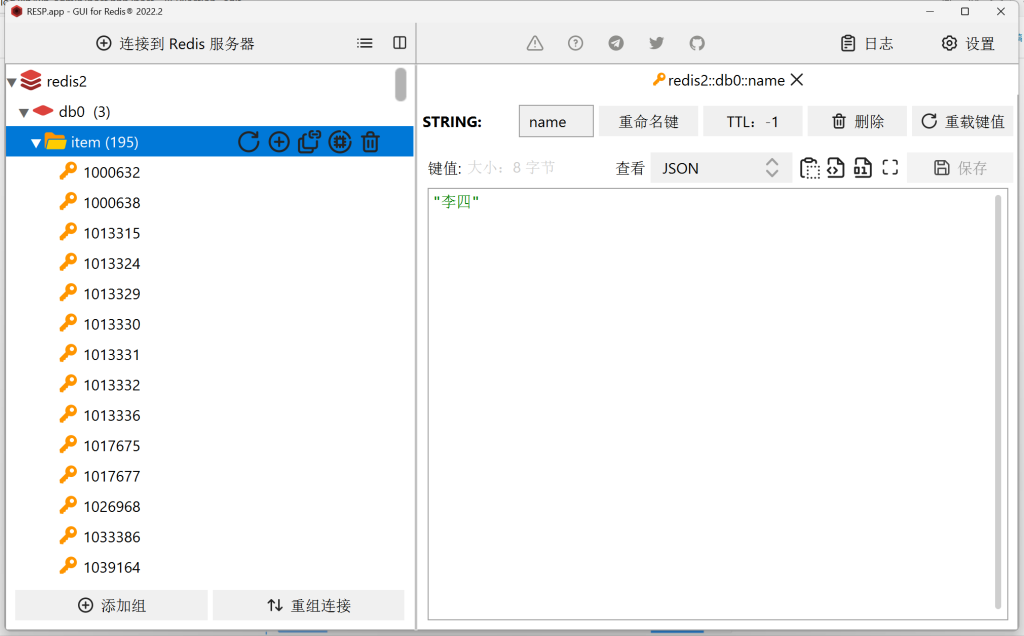
}可以访问http://localhost:8081/doc.html#/去调用对应api,可以看到第一次调用后redis中确实有数据了:
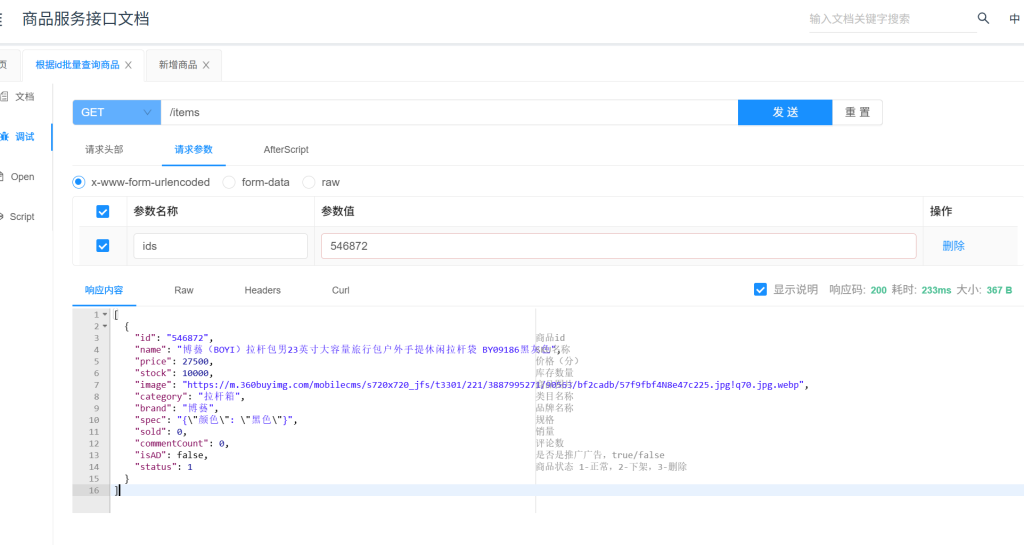
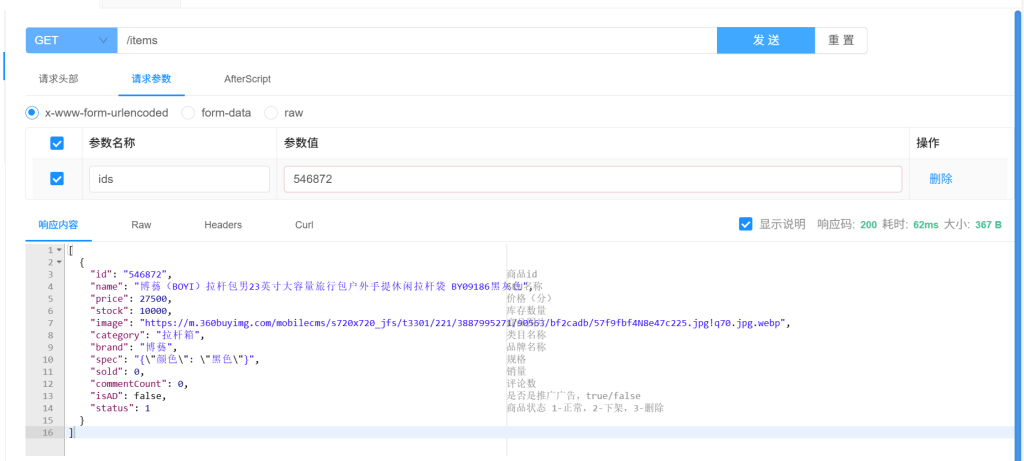
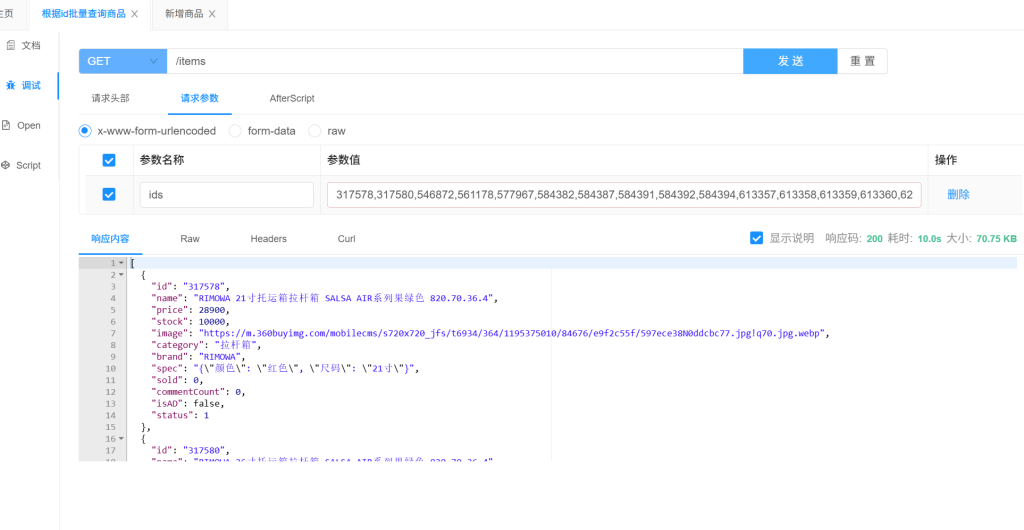
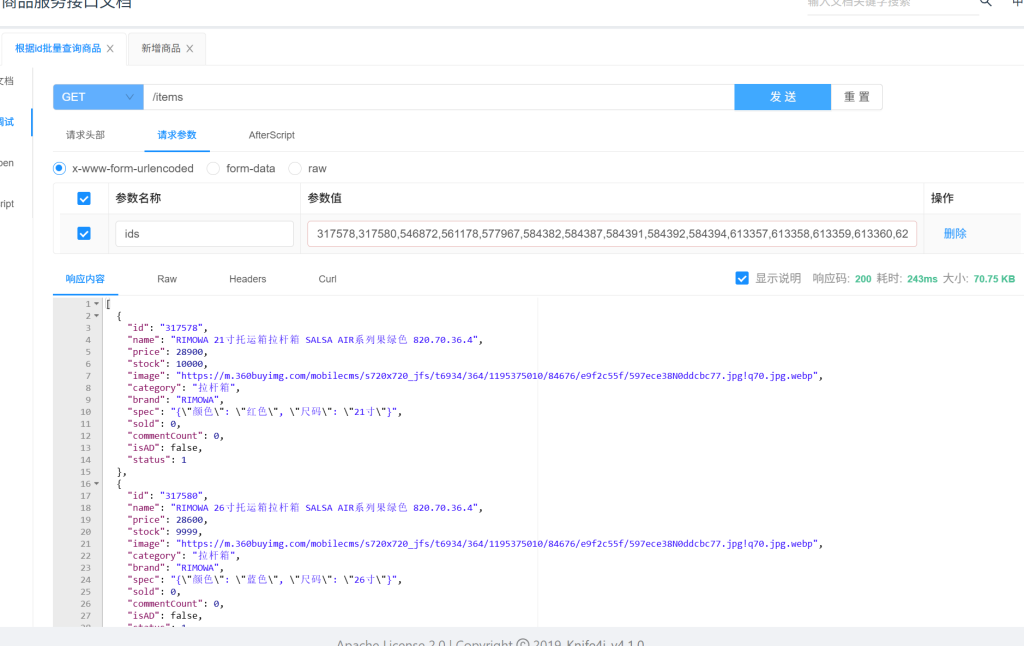
我们可以检查一下redis是否真的增加了查询速度:
如下图所示,以queryItemByIds为例,无论查询数据是少是多,当第一次查询,redis无数据时的耗时都远大于redis有数据时的情况,redis确实加快了数据查询速度。
然后我们也改进一下其他服务
3.2购物车服务 (cart-service)
private void handleCartItems(List<CartVO> vos) {
        // TODO 1.获取商品id
        Set<Long> itemIds = vos.stream().map(CartVO::getItemId).collect(Collectors.toSet());
        // 2.批量查 Redis
        List<String> redisKeys = itemIds.stream().map(id -> "item:" + id).collect(Collectors.toList());
        List<Object> cachedList = redisTemplate.opsForValue().multiGet(redisKeys);

        List<ItemDTO> items = new java.util.ArrayList<>();
        List<Long> missIds = new java.util.ArrayList<>();
        int idx = 0;
        for (Long id : itemIds) {
            Object obj = cachedList.get(idx++);
            if (obj != null) {
                items.add((ItemDTO) obj);
            } else {
                missIds.add(id);
            }
        }
        // 3.查数据库并回写 Redis
        if (!missIds.isEmpty()) {
            List<ItemDTO> dbItems = itemClient.queryItemByIds(missIds);
            for (ItemDTO item : dbItems) {
                redisTemplate.opsForValue().set("item:" + item.getId(), item, 1, java.util.concurrent.TimeUnit.HOURS);
                items.add(item);
            }
        }

        if (CollUtils.isEmpty(items)) {
            throw new BadRequestException("购物车中商品不存在");
        }
        // 4.转为 id 到 item的map
        Map<Long, ItemDTO> itemMap = items.stream().collect(Collectors.toMap(ItemDTO::getId, Function.identity()));
        // 5.写入vo
        for (CartVO v : vos) {
            ItemDTO item = itemMap.get(v.getItemId());
            if (item == null) {
                continue;
            }
            v.setNewPrice(item.getPrice());
            v.setStatus(item.getStatus());
            v.setStock(item.getStock());
        }
    }
3.3用户服务 (user-service)
@ApiOperation("查询当前用户地址列表")
@GetMapping
public List<AddressDTO> findMyAddresses() {
    Long userId = UserContext.getUser();
    String redisKey = "address:list:" + userId;
    // 1.先查 Redis
    List<AddressDTO> cachedList = (List<AddressDTO>) redisTemplate.opsForValue().get(redisKey);
    if (cachedList != null && !cachedList.isEmpty()) {
        return cachedList;
    }
    // 2.查数据库
    List<Address> list = addressService.query().eq("user_id", userId).list();
    if (CollUtils.isEmpty(list)) {
        return CollUtils.emptyList();
    }
    List<AddressDTO> result = BeanUtils.copyList(list, AddressDTO.class);
    // 3.写入 Redis,设置过期时间(如1小时)
    redisTemplate.opsForValue().set(redisKey, result, 1, java.util.concurrent.TimeUnit.HOURS);
    return result;
}